Monday, May 13, 2013

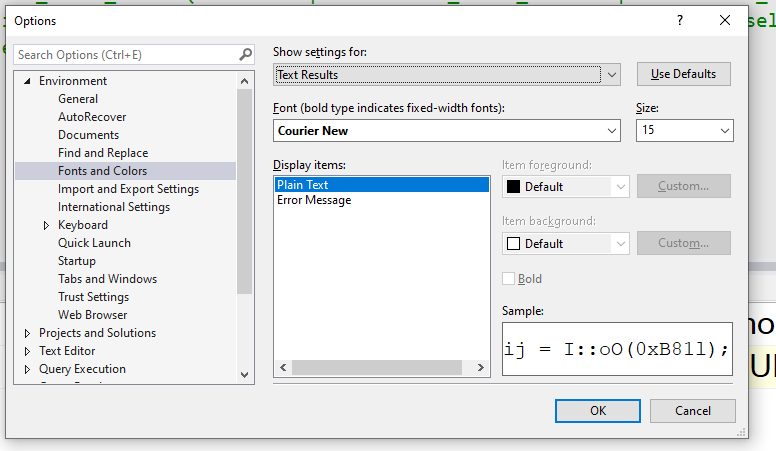
PowerShell Syntax Highlighting in Visual Studio 2012

Why Visual Studio does not support PowerShell file is a good question and I do not have the answer.
But my Visual Studio Extension TextHighLighter now offer color coding and some limited intellisense for PowerShell extension .ps1, psd1 and .psm1.


Nodejitsu unexpected price changed!

Nodejitsu just informed me that my one nodejs instance monthly price will go from $3 to $9 a month. What?

I am using this instance to play with nodejs in the cloud. Just to play this will cost me $108 a year.

I would have accepted $4 a month to allow them to survive, but who increase his pricing by 3 and remain in business.

I guess they really pushed me to Microsoft Azur.

Friday, May 10, 2013

Customize syntax highlighting colors for batch and json file in Visual Studio

The Visual Studio 2012 extension TextHighLighter  v 3.0 allows now to customize the colors of each text file extension supported (.bat, .json, .ini, .ps1, .txt, .log) using the menu Tools -> Options menu.


Sunday, April 21, 2013

Issue defining VSIX dependency with Visual Studio 2012


If you use the Visual Studio 2012 manifest designer to define a dependency between one VSIX and another you will end up with this compilation error

Error 10 The 'DisplayName' attribute is invalid -
The value 'TextHighlighterConfiguration;VSIXNameProjectOutputGroup|'
is invalid according to its datatype 'String' -
The actual length is greater than the MaxLength value.
C:\Users\frederic.torres\Desktop\TextHighlighterExtensionV20\TextHighlighterExtension\source.extension.vsixmanifest
TextHighlighterExtension2012

Solution

Right click on the file source.extension.vsixmanifest select open with in <Dependency> tag defining your dependency reset the content of the attribut DisplayName with the name of your extension.


Sunday, March 31, 2013

Intellisense in Batch file with Visual Studio 2012

Out of the box Visual Studio does not support batch file. No syntax highlighting and obviously no form of intellisense. My extension TextHighlighterExtension2012 already offered syntax highlighting, but now offer basic intellisense around

  • variables declared in the batch file
  • environment variables
  • label declared in the batch file

The youtube video is Batch file intellisense in Visual Studio 2012.

Screenshots.


Saturday, February 23, 2013

JSON.net support C# keyword dynamic

JSON.net supports the C# keyword dynamic.  Let's start with the following JSON dataset. .
 
{ 
    "LastName"  : "Smith",
    "FirstName" : "John",
    "Age"       : 32,
    "Male"      : true,
    "BirthDate" : "1962-12-11T00:00:00Z",
    "Other"     : null
}
The function JObject.Parse() returns a JObject that we will store into a C# dynamic object. Now we can dynamically access all properties defined in the JSON object (No need to define a class. Am I in JavaScript or what?).
 
dynamic person = JObject.Parse(System.IO.File.ReadAllText("Person.json"));   
Console.WriteLine(person.LastName);
Console.WriteLine(person.FirstName); 
Console.WriteLine(person.Age);
Console.WriteLine(person.Male);
Console.WriteLine(person.BirthDate);
We can also add a new property on the fly and request the JSON representation.
person.Loaded = true; // New property
Console.WriteLine(JsonConvert.SerializeObject(person, Formatting.Indented));
 
{
  "LastName": "Smith",
  "FirstName": "John",
  "Age": 32,
  "Male": true,
  "BirthDate": "1962-12-11T00:00:00Z",
  "Other": null,
  "Loaded": true
}
Nested object and array are supported. Trying to access a undefined property will return null.
Thanks to james newton king .

Sunday, February 17, 2013

From the cloud to your iPhone

How do you bring data from the cloud to your customers or employee's iPhone, iPad or iPod?

With a minimum of work and cost.

How do you keep the data up to date ?

In the video jsonB Hello World, I show how to customize a json dataset about countries in the world from Windows using Visual Studio Express.


jsonB is a JSON Browser for iOS, a software application for retrieving, presenting and traversing JSON dataset downloaded from any web server from the cloud. In this post I am focusing only on static data (data that do not change or change every day or hours), jsonB can also interact with a rest services and with this mode we can build mini mobile app (minimapp). See post [TO-COME]


Sunday, February 3, 2013

avidvdburner, certified-toolbar and malware

avidvdburner will install the malware certified-toolbar on your machine without even asking your permission at least on Windows XP.

After I payed $29 and registered avidvdburner, I noticed that my laptop was overheating and looked at the task manager and a program named setup.exe was using the cpu. Then my browsers home page were high jacked.

I was able to un install it via the control panel. But I think my laptop is now compromised.

This was confirmed by Andrew Thomson from avidvdburner support.

On top of that the menu feature that was the reason I decided to buy the software sucks. I feel I have been "ripped off".

Every time I will upgrade the software it will re install 
the malware certified-toolbar.

Do not buy avidvdburner.


Saturday, January 19, 2013

Text file Syntax highlighting for Visual Studio


The extension TextHighlighterExtension for Visual Studio 2010 support text file color coding.
Both extension .txt and .log are supported.


Color Customization

The color customization of each line is based on the following JSON data, which assign a regular expression with a color.


 TXT: { /* Color definition for .txt file */
        "\\[WARNING\\]"            : "DarkGoldenrod",     
        "\\[ERROR\\].*Minor"       : "Salmon"       ,
        "\\[ERROR\\]"              : "bold.Red"     ,
        "\\[INFO\\]"               : "LightBlue"    ,
        "\\[PASSED\\]"             : "Green"        ,
        ""                         : "NavajoWhite" /* The last item is the default color */
    },

Monday, January 7, 2013

Batch File Syntax Highlighting For Visual Studio

The extension TextHighlighterExtension for Visual Studio 2010 support batch file color coding.
Both extension .bat and .cmd are supported.


To install the extension see post

Ini File Syntax Highlighting For Visual Studio

The extension TextHighlighterExtension for Visual Studio 2010 support INI file color coding


Colors Customization


The extension comes with default colors set for black and white background.
If you want to customize the colors goto to the folder:

C:\Users\[USER-NAME]\AppData\Local\Microsoft\VisualStudio\10.0Exp\Extensions\Frederic Torres\TextHighlighterExtension\2.0

Open the file Colors.htm in Internet Explorer to visualize the color names available.
Update the file COLORS_DEFINITION.js to change the colors.
To reset the color delete the file Config.json


To install the extension see this post.

JSON Syntax Highlighting And Validation For Visual Studio

The extension TextHighlighterExtension for Visual Studio 2010 and 2012 now support JSON color coding and validation on the fly. By default the JSON validation is strict, but can be turn into a more relax mode where trailing comma, property name as id and // comment are supported.
Even in strict mode the /* */ comments are supported though it is not strictly JSON.


Colors Customizations

The extension comes with default colors set for black and white background.
If you want to customize the colors goto to the folder:  

Visual Studio 2010:

C:\Users\[USER-NAME]\AppData\Local\Microsoft\VisualStudio\10.0\Extensions\Frederic Torres\TextHighlighterExtension\2.0 

Visual Studio 2012:

C:\Users\[USER-NAME]\AppData\Local\Microsoft\VisualStudio\11.0\Extensions\gpfoku5l.btj

Open the file Colors.htm in Internet Explorer to visualize the color names available.
Update the file COLORS_DEFINITION.js to change the colors.
To reset the colors delete the file Config.json.

\\


JSON Standard
The extension offer JSON Syntax Validation


In the extension v 2.0 the following are accepted but are not part of the JSON standard
  • /* */ comment
  • If the first comment contains "use relax" (with the double quote), property names do not have to be string but can be id name like in JavaScript. Trailing coma are accepted.

How to install the extension

Menu: Tools -> Extension Manager


Tuesday, October 9, 2012

How to run TypeScript from the command line


With node js.

node "C:\J\EcmaScript_NET_ShellUnitTests\TypeScript\bin\tsc.js"  "C:\JS1.ts"

With the old Microsoft JScript.

cscript.exe //E:jscript "C:\J\EcmaScript_NET_ShellUnitTests\TypeScript\bin\tsc.js"  "C:\JS1.ts"


Saturday, July 14, 2012

How to determine if an iOS view is pushed or popped with MonoTouch

This is a translation from Objective C to C# of the stackoverflow answer for: viewWillDisappear: Determine whether view controller is being popped or is showing a sub-view controller


public override void ViewWillDisappear (bool animated)
{
    var a = iOSUtils.GetActionOnView(this);
    
    if(a == iOSUtils.ViewOperation.Popped) {
    
    }
    else if(a == iOSUtils.ViewOperation.Pushed) {
    
    }
    base.ViewWillDisappear (animated);
}


public class iOSUtils {

  public enum ViewOperation {
   Pushed,
   Popped,
   Unknown
  }
  public static ViewOperation GetActionOnView(UIViewController viewController) {
     
   var viewControllers = viewController.NavigationController.ViewControllers;
   if(viewControllers.Length > 1 && viewControllers[viewControllers.Length-2] == viewController){
    return ViewOperation.Pushed;
   }
   else if(!viewControllers.Contains(viewController)){
    return ViewOperation.Popped;
   }
   return ViewOperation.Unknown;
  }
}

Friday, June 1, 2012

JavaScript For C# Developers

No reason for a C# developer not to appreciate JavaScript. For more .NET like goodies in JavaScript, see my library fjs.lib.


Creating An Object (Object Literal)


C#
public class AClass {    

    static void Main() {

        var p = new AClass();
    }
}


JavaScript
 var p = { }; 


Creating An Object (Function Constructor)


C#
public class AClass {    

    static void Main() {

        var p = new AClass();
    }
}


JavaScript
function AClass() {

}
var p = new AClass();


Creating An Object (Object Literal II)


  • Anonymous Type vs Object Literal

C#
 var p = new { LastName = "Doe" };
    

JavaScript
 var p = { LastName : "Doe" };


Object With Properties And Methods (Object Literal)


C#
public class Person {

    public string LastName { get; set; }

    public Person(string lastName) {

        this.LastName = lastName;
    }
    public void Run() {

        Console.WriteLine(this.LastName + " is running...");
    }
    static void Main() {

        var p = new Person("Doe");
        p.Run(); 
    }
}

JavaScript
var p = {
     LastName : "Doe",
     run      : function() {

                        print(this.LastName + " is running..."); 
                   }
        };

p.run();


Object With Properties And Methods (Function Constructor)


C#
public class Person {

    public string LastName { get; set; }

    public Person(string lastName) {

        this.LastName = lastName;
    }
    public void Run() {

        Console.WriteLine(this.LastName + " is running...");
    }
    static void Main() {

        var p = new Person("Doe");
        p.Run(); 
    }
}


JavaScript
function Person(lastName) {

    this.LastName = lastName;

    this.run = function() {

        print(this.LastName + " is running...");
    }
}
var p = new Person("Doe", "Joe");
p.run(); 


Object With Properties And Methods (Function Constructor And Prototype)


  • Attaching the method run() to the prototype of the function constructor Person() is more efficient as the code of the method run() is not duplicated for each object.
  • You cannot use the Closure function.
  • Not as clear as the previous syntax (According to my taste).

C#
public class Person {

    public string LastName { get; set; }

    public Person(string lastName) {

        this.LastName = lastName;
    }
    public void Run() {

        Console.WriteLine(this.LastName + " is running...");
    }
    static void Main() {

        var p = new Person("Doe");
        p.Run(); 
    }
}


JavaScript
function Person(lastName) {

    this.LastName = lastName;
}
Person.prototype.run = function() {

    print(this.LastName + " is running...");
}
var p = new Person("Doe", "Joe");
p.run(); 


Reflection And Property


C#
    const BindingFlags GET_FLAGS = BindingFlags.Instance | BindingFlags.Public | 
                                   BindingFlags.GetField | BindingFlags.GetProperty;

 var p = new { LastName = "Doe" };

    Console.WriteLine(p.GetType().InvokeMember("LastName", GET_FLAGS, null, p, null));

    Console.WriteLine(p.LastName);


JavaScript
    var p = { LastName   : "Doe" };

    print(p["LastName"]);    

    print(p.LastName);


Reflection And Object


C#
public class Program {

    static void Main() {

        var p = new { LastName = "Doe", FirstName = "Joe" };

        foreach(var propertyInfo in p.GetType().GetProperties()) {

            Console.WriteLine(propertyInfo.Name + " = " + propertyInfo.GetValue(p, null).ToString());
        }
    }
}


JavaScript
var p = { LastName : "Doe", FirstName : "Joe" };

for(var propertyName in p) {

    print(propertyName + " = " + p[propertyName]);
}


Inheritance


C#
public class Person {

    public string   LastName  { get; set; }
    public string   FirstName { get; set; }
        
    public Person(string lastName, string firstName) {

        this.LastName  = lastName;
        this.FirstName = firstName;
    }
}
public class Employee : Person {

    public string Company  { get; set; }
    
    public Employee(string lastName, string firstName, string company) : base(lastName, firstName) { // <= Base constructor

        this.Company = company;
    }
    static void Main() {

        var e = new Employee("Doe", "Joe", "ACompany");     
    }
}


JavaScript
function Person(lastName, firstName) {

    this.LastName  = lastName;
    this.FirstName = firstName;
}
function Employee(lastName, firstName, company) {
     
    Person.call(this, lastName, firstName); // <= Base constructor
    this.Company = company;
}
Employee.prototype = new Person(); // Inheritance

var e = new Employee("Doe", "Joe", "ACompany");


Private Property


C#
public class Employee  {

    public string LastName             { get; set; }
    public string FirstName            { get; set; }
    private bool  _reservedParkingSpot { get; set; }

    public Employee(string lastName, string firstName, bool reservedParkingSpot) {

        this.LastName             = lastName;
        this.FirstName            = firstName;
        this._reservedParkingSpot = reservedParkingSpot;
    }
    public void Run() {
    
        Console.WriteLine(this.LastName + " reservedParkingSpot:" + _reservedParkingSpot);
    }
    static void Main() {

        var e = new Employee("Doe", "Joe", true);
        e.Run();
    }
}
 

JavaScript
function Employee(lastName, firstName, reservedParkingSpot) {
    var
        _reservedParkingSpot = reservedParkingSpot;

    this.LastName  = lastName;
    this.FirstName = firstName;

    this.run = function() {

        print(this.LastName + " reservedParkingSpot:" + _reservedParkingSpot);
    }
}
var e = new Employee("Doe", "Joe", true);
e.run();


Virtual Methods


  • In JavaScript all properties and methods are virtual and public

C#
public class Person{

    public string   LastName  { get; set; }
    public string   FirstName { get; set; }
        
    public Person(string lastName, string firstName){

        this.LastName  = lastName;
        this.FirstName = firstName;
    }
    public virtual void Run(){
    
        Console.WriteLine(this.LastName + " is running...");
    }
}
public class Employee : Person {

    public string Company  { get; set; }
    
    public Employee(string lastName, string firstName, string company) : base(lastName, firstName) { // <= Base constructor

        this.Company = company;
    }
    public override void Run() {

        Console.WriteLine(this.FirstName + " " + this.LastName + " is running...");
    }
    static void Main() {

        var e = new Employee("Doe", "Joe", "ACompany");
        e.Run();         
    }
}

JavaScript
function Person(lastName, firstName){

    this.LastName  = lastName;
    this.FirstName = firstName;

 this.run = function(){ 

        print(this.LastName + " is running...");
    }
}
function Employee(lastName, firstName, company) {
     
    Person.call(this, lastName, firstName); // <= Base constructor
    this.Company = company;

 this.run = function() { // <= Just override the method

        print(this.FirstName + " " + this.LastName + " is running...");
    }
}
Employee.prototype = new Person(); // Inheritance

var e = new Employee("Doe", "Joe", "ACompany");
e.run();


Optional Parameters


  • In C# optional parameters are available in version 4
  • In JavaScript all parameters are optional, with a default value of undefined

C#
public class Person { 

    public string LastName  { get; set; }
    public string FirstName { get; set; }
    public string Company   { get; set; }

    public Person(string lastName, string firstName, string company = null) {

        this.LastName  = lastName;
        this.FirstName = firstName;
        this.Company   = company;
    }
    static void Main() {

        var p = new Person("Doe", "Joe");
        Console.WriteLine("Company:" + p.Company);
    }
}

JavaScript
Person = function(lastName, firstName, company) {

    company = company || null; // Define a default value

    this.LastName  = lastName;
    this.FirstName = firstName;
    this.Company   = company; 
}
var p = new Person("Doe", "Joe");
print("Company:" + p.Company);


Extension Methods


  • Let's add a new format() method to a C# List and a JavaScript Array

C#
public static class Program { 

    public static string Format<T>(this List<T> l) {

        var b = new StringBuilder(1000);

        for(var i = 0; i < l.Count; i++) {

            b.Append(l[i]);
            if(i < l.Count-1)
                b.Append(", ");
        }
        return b.ToString();
    } 
    static void Main() {

        var l = new List<int>();
        l.Add(1);
        l.Add(2);
        l.Add(3);
        Console.WriteLine(l.Format());
    }
}


JavaScript
if (typeof Array.prototype.format !== 'function') {

    Array.prototype.format = function () {
        
        return this.join(", ");
    }
}

var a = [];
a.push(1);
a.push(2);
a.push(3);
print(a.format())


Static Member


C#
public class Person {

    public string LastName  { get; set; }
    public string FirstName { get; set; }

    public Person(string lastName, string firstName) {

        this.LastName  = lastName;
        this.FirstName = firstName;
    }
    public static Person Create(string lastName, string firstName) { // <= Static Member 

        return new Person(lastName, firstName);
    }
    static void Main() {

        var p = Person.Create("Doe", "Joe");
    }
}


JavaScript
function Person(lastName, firstName) {

    this.LastName  = lastName;
    this.FirstName = firstName;
}
Person.create = function(lastName, firstName) { // <= Static Member 

    return new Person(lastName, firstName);
}
var p = Person.create("Doe", "Joe");


Namespace


C#

namespace MyLibrary {

    public class Person {

        public string LastName  { get; set; }
        public string FirstName { get; set; }

        public Person(string lastName, string firstName) {

            this.LastName  = lastName;
            this.FirstName = firstName;
        }
    }
}
public class Program {

    static void Main() {

        var p = new MyLibrary.Person("Doe", "Joe");
    }
}


JavaScript
var MyLibrary = {

    Person : function (lastName, firstName) {

        this.LastName  = lastName;
        this.FirstName = firstName;
    }
}
var p = new MyLibrary.Person("Doe", "Joe");


Enum Type


C#
public enum EmployeeType {

    Developer,
    Manager  ,
}
public class Employee : Person {

    public string Company    { get; set; }
    public EmployeeType Type { get; set; }
    
    public Employee(string lastName, string firstName, string company, EmployeeType type) :base(lastName,firstName) {

        this.Company = company;
        this.Type    = type;
    }
    static void Main() {
        var e = new Employee("Doe", "Joe", "ACompany", EmployeeType.Developer);
        e.Run();         
    }
}
 

JavaScript
var EmployeeType = {

    Developer : 0,
    Manager   : 1
}
function Employee(lastName, firstName, company, type) {

    Person.call(this, lastName, firstName);
    this.Company = company;
    this.Type    = type;
}
Employee.prototype = new Person();

var e = new Employee("Doe", "Joe", "ACompany", EmployeeType.Developer);
e.run();


.NET Attribute


C#
[AttributeUsage(AttributeTargets.Method, AllowMultiple = false)]
public class SuperMethodAttribute : System.Attribute {

}        
public class TheClass {    

    [SuperMethod] // <= .NET Attribute
    public void Run() {

    }
}       
public class Program {    

    public static string GetSuperMethodName(object o) {

        foreach (var mi in o.GetType().GetMembers())
            foreach (object attribute in mi.GetCustomAttributes(true))
                if (attribute is SuperMethodAttribute)
                    return mi.Name;

        return null;
    }
    static void Main() {

        var theClass = new TheClass();
        Console.WriteLine("The SuperMethod is " + GetSuperMethodName(theClass));
    }
}


JavaScript
function TheClass() {

    this.run = function() {

    }
    this.run.SuperMethod = true; // <= JavaScript Attribute For A Function
}
function GetSuperMethodName(o) {

    for(var p in o)
        if(typeof o[p] === "function") 
            if(o[p].SuperMethod === true)   
                return p;

    return null;
}
var theClass = new TheClass();
print("The SuperMethod is " + GetSuperMethodName(theClass));


Dictionary<K,V> vs JavaScript Object


C#
var trace = new Dictionary<string, object>();

trace["Debug"]     = true;
trace["Trace"]     = "warning";
trace["TraceSize"] = 1000;

foreach(var e in trace) {

    Console.WriteLine(e.Key + " = " + e.Value.ToString());
}


JavaScript
var trace = { };

trace["Debug"]  = true;
trace["Trace"]  = "warning";
trace.TraceSize = 1000;

for(var key in trace) {

    print(key + " = " + trace[key]);
}


Dictionary<K,V> vs JavaScript Object - The ContainKey() vs in operator


C#
var trace = new Dictionary<string, object>() {

    { "Debug"    , true      },
    { "Trace"    , "warning" },
    { "TraceSize", 1000      }
};

if(trace.ContainsKey("Debug"))
    Console.WriteLine(trace["Debug"]);   


JavaScript
var trace = {
    Debug     : true     ,
    Trace     : "warning",
    TraceSize : 1000
};

if("Debug" in trace)                // Solution 1
    print(trace["Debug"]);

if(trace["Debug"] !== undefined)    // Solution 2
    print(trace["Debug"]);

if(trace.Debug !== undefined)       // Solution 3
    print(trace.Debug);


JavaScript Array


  • A JavaScript Array is not a C# array
  • JavaScript Array is neither an hybrid between array and list
  • A JavaScript Array is a Dictionary where the keys can only be integer
    • The property length always returns the max key

JavaScript Arrays can be used as

  • Array - Array<T>
  • List - List<T>
  • Stack - Stack<T>
  • Queue - Queue<T>

  • Array methods:

    • concat, indexOf, join, pop, push, reverse, shift, slice, sort, splice, unshift, valueOf.

With Extension Methods we can create the C# methods that we are used to.

C#
var a = new List<object>();

var b = new List<int>() { 1, 2, 3 };

var c = new List<string>() { "a", "b", "c" };


JavaScript
var a = [ ];

var b = [ 1, 2, 3 ];

var c = [ "a", "b", "c" ];


Iterating Through An Array - Recommended


  • The default way

C#
var a = new string[] { "a", "b", "c" };

for(var i = 0; i < a.Length; i++) {
 
    Console.WriteLine(a[i]);
}

JavaScript
var a = [ "a", "b", "c" ];
 
for(var i = 0; i < a.length; i++) {
 
    print(a[i]);
}


Iterating Through An Array - Not Recommended


C#
var a = new List<string>()  { "a", "b", "c" };

foreach(var i in a) {
 
    Console.WriteLine(i);
}


JavaScript
var a = [ "a", "b", "c" ];
 
for(var i in a) { // <= Iterate over the keys of the Object/Array, which happens to be indexes

    print(a[i]);
}


Iterating Through An Array - The Functional Way


  • The method forEach()
    • With JavaScript 5 (ecmascript 5), the Array type has a member function forEach()
    • With JavaScript 3, include the library: http://augmentjs.com

C#
var a = new List<string>()  { "a", "b", "c" };

a.ForEach(
     v => { Console.WriteLine(v); } // <= Lambda Statment
);


JavaScript
var a = [ "a", "b", "c" ];

a.forEach(
    function(v) { print(v); } // <= Lambda Statment
);


JavaScript Array Used As A Stack<T>


C#
var a = new Stack<string>();

a.Push("a");
a.Push("b");
a.Push("c");

while(a.Count > 0) {

     Console.WriteLine(a.Pop());
}


JavaScript
var a = [ ];

a.push("a");
a.push("b");
a.push("c");

while(a.length > 0) {

    print(a.pop());
}


JavaScript Array Used As A Queue<T>


C#
var queue = new Queue<int>();

queue.Enqueue(1);
queue.Enqueue(2);
queue.Enqueue(3);
             
while(queue.Count > 0){
 
    Console.WriteLine(queue.Dequeue());
}


JavaScript
var queue = [];
 
queue.unshift(1);
queue.unshift(2);
queue.unshift(3);
 
while(queue.length > 0){
 
    print(queue.pop());
}


Lambda Expression


  • The following methods: filter(), forEach(), every(), map() are available for Array with ECMAScript 5 or include http://augmentjs.com

C#
var numbers = new List<int> { 1, 2, 3, 4, 5, 6, 7, 8, 9 };

var evenNumbers = numbers.FindAll( i => i % 2 == 0 ); // <= Lambda Expression

evenNumbers.ForEach(n => {  // <= Lambda Statment

    Console.WriteLine(n); 
});


JavaScript
var numbers = [ 1, 2, 3, 4, 5, 6, 7, 8, 9 ];

var evenNumbers = numbers.filter( function(i) { return i % 2 === 0; } ); // <= Lambda Expression

evenNumbers.forEach(function(n) {

    print(n);
});


LINQ


C#
public class Program {    

    static void Main() {

        var annoyingPeopleInHighSchool = new List<Person>() {

            new Person("Descartes", "Rene"        ),
            new Person("Pascal"   , "Baise"       ),
            new Person("Laplace"  , "Pierre-Simon")
        };

        var funnyPeopleInHighSchool = from p in annoyingPeopleInHighSchool
            where p.LastName == "Laplace"
            select p;
            
        foreach(var p in funnyPeopleInHighSchool) {

            Console.WriteLine(p.LastName);
        }
    }
}


JavaScript
var annoyingPeopleInHighSchool = [

    new Person("Descartes", "Rene"        ),
    new Person("Pascal"   , "Baise"       ),
    new Person("Laplace"  , "Pierre-Simon")
];

var funnyPeopleInHighSchool = annoyingPeopleInHighSchool.filter(function(p) {

    return p.LastName === "Laplace" ? p : undefined;
});

for(var p in funnyPeopleInHighSchool) { 

    print(funnyPeopleInHighSchool[p].LastName);
}


GetType() vs getType()


C#
int i = 1;
Console.WriteLine(i.GetType().Name);

bool b = true;
Console.WriteLine(b.GetType().Name);

String s = "Hi";
Console.WriteLine(s.GetType().Name);

DateTime d = DateTime.Now;
Console.WriteLine(d.GetType().Name);

int [] ia = new int[3];
Console.WriteLine(ia.GetType().Name);


JavaScript
var i = 1;
print(getType(i));

var b = true;
print(getType(b));

var s = "Hi";
print(getType(s));

var d = new Date();
print(getType(d));

var ia = [];
print(getType(ia));

function getType(v) {

    var type;
    if (v === null)
        return "null";
    if (typeof v === 'undefined')
        return "undefined";

    type = Object.prototype.toString.call(v);
    type = type.replace("[object ", "").replace("]", "");
    return type;
}


Inheriting from a List<T> vs Inheriting From An Array


C#
public class PersonList : List<Person> {

    public string Name;

    public PersonList(string name) {

        this.Name = name;
    }
    public int GetSumYears() {

        var total = 0;
        foreach (var p in this)
            total += p.BirthDate.Year;
        return total;
    }
}
public class Program {    

    static void Main() {

        var personList = new PersonList("MyList");

        personList.Add(new Person("Descartes", "Rene"        , new DateTime(1596, 3, 31)));
        personList.Add(new Person("Pascal"   , "Baise"       , new DateTime(1623, 6, 19)));
        personList.Add(new Person("Laplace"  , "Pierre-Simon", new DateTime(1749, 3, 23)));

        Console.WriteLine(String.Format("Total {0} {1}", personList.Name, personList.GetSumYears()));
    }
}


JavaScript
function PersonList(name) {

    this.Name = name;

    this.GetSumYears = function() {
        var
            i     = 0,
            total = 0;

        for(i = 0; i < this.length; i++)
            total += this[i].BirthDate.getFullYear();

        return total;
    }
}
PersonList.prototype = []; // <= Inheritance from an Array

var personList = new PersonList("MyList");

personList.push(new Person("Descartes", "Rene"        , new Date(1596, 3-1, 31)));
personList.push(new Person("Pascal"   , "Baise"       , new Date(1623, 6-1, 19)));
personList.push(new Person("Laplace"  , "Pierre-Simon", new Date(1749, 3-1, 23)));

print("Total "+personList.Name+" "+personList.GetSumYears());

Monday, January 2, 2012

Customizing an ASP.NET MVC app with a dynamic language

Overview
I like to configure and extend application or service written in C# by using a dynamic language. This form of architecture allows to create customizable application, and the customization is simple, immediate and clean.

Goal
In this post I am going to show how to build customizable ASP.NET MVC application and the nice syntax obtained.

This is just a prototype to showcase my idea.

In my project I created a folder Dictionary, which contains Python and PowerShell files. For now we will focus on the Python files.


The file App.py contains one Python dictionary with 2 entries. As you may reconized this file is also JSON compatible and even if you do not know Python, it is easy to read and understand.
Dic = {

    "ApplicationTitle"   : "My Customized App Title",
    "ApplicationVersion" : 1.2
}
In my view, I reference the entries this way.

AppTitle:@ViewBag.ApplicationTitle AppVersion:@ViewBag.ApplicationVersion

In my C# controler the only change is the base class.
public class HomeController : Dynamic4MVC.ControllerExtended {

}
So far the App.py file is just a static configuration file.

I added a new entrie named SupportedDays. This entry is a list of string and it is initialized by invoking the function GetSupportedDays(). Now that's where using a dynamic language versus an XML file becomes interesting, because we can execute code to initialize data, when the Python file is loaded.
def GetSupportedDays():
    return ["Monday", "Wednesday", "Friday"]

Dic = {

    "ApplicationTitle"   : "My Customized App Title",
    "ApplicationVersion" : 1.2,
    "SupportedDays"      : GetSupportedDays()    
}
In my view, I reference the entry SupportedDays this way.
SupportedDays:
    @foreach (var d in ViewBag.SupportedDays) {
        @: @d,
    }
We can go a little bit further, by implementing our own class, instantiating objects and invoke methods. The method ToString() will be automatically invoked by the Razor engine.
class User(object):

    def __init__(self, userName):
        self.UserName = userName

    def ToString(self):
        return "user:%s" % self.UserName

Dic = {
    "Users" : [ 
           User("FTorres"), 
           User("RDescartes")
    ]
}
In my view, I reference the entry Users this way.
@foreach (var u in ViewBag.Users) {
        @: User:@u
}   
Conclusion
At this point we can build a nice DSL (Martin Fowler called them Internal DSL) dedicated to the customization of the application.

Python syntax is clean and succinct, and IronPython being a .NET language, there is no integration problem and it is fast. Mixing C# 4.0 and IronPython, is easy and very powerful. It is possible to do it with .NET C# 2.0/3.5 with a little bit more difficulties.

JavaScript is also a possibilty with the Jurassic runtime which is slow compared to the JavaScript runtime in Chrome or IE9, though speed is not really a problem here.

Mixing C# and PowerShell v 2 is easy, but the API is kind of ugly and cannot leverage the dynamic feature of C# 4.0 out of the box, like with IronPython. I had to write some internal wrapper described in my post Running PowerShell from C# with a hint of dynamic. With PowerShell v 3, the problem should be solved.

Depending of your type of application, you may have to cache the dictionary in the Session object, the Application object or your mem cache, because loading and evaluating IronPython or PowerShell code is slow.

Obviously, those who hate dynamic languages will find this post awful. A more valid question is to ask is: Is it reasonable to ship on a product machine code in a text file?

To this question I generally find more Pros than Cons. That's just me.

The source code is on github at DynamicCsToPowerShell-Library

Friday, December 30, 2011

Running PowerShell from C# with a hint of dynamic

This is an adaptation of my post Running JavaScript from C# with a hint of dynamic using PowerShell.

Here is a sample using the default api, to execute a powershell code snippet and then access a global variable defined in the PowerShell world from C#.
var script = @" $i1 = 123 ";            
var ps = PowerShell.Create();
ps.AddScript(script);
ps.Invoke();            

int i1 = (int)ps.Runspace.SessionStateProxy.GetVariable("i1");

Assert.AreEqual(123, i1);
What bother me the most is the line 6. Here is the same code using the library DynamicCsToPowerShell.
var script = @" $i1 = 123 ";

var dpsc = DynamicPowerShellContext.Create().Run(script);

int i1 = dpsc.i1;

Assert.AreEqual(123, i1);
Now compare line 6 from code snippet 1 and line 5 of code snippet 2. The goal of the library DynamicCsToPowerShell is to provide this kind of syntax.

Loading A Configuration File Defined With PowerShell
Here is a script that implements a .NET hashtable in PowerShell. This can be viewed as a simple configuration file.
# An Hashtable in PowerShell
$Dic = @{

    a = 1
    b = 2
    c = 3
}
Here is how to load, access and use the hashtable.
[TestMethod]
public void Dictionary_IntLoadFromFile() {
            
    var ps1ConfigFile = @"..\IntDictionary.ps1";
    var dpsc          = DynamicPowerShellContext.Create();
    dpsc.LoadFile(ps1ConfigFile).Run();

    Assert.AreEqual(3, dpsc.Dic.Count);

    Assert.AreEqual(1, dpsc.Dic["a"]);
    Assert.AreEqual(2, dpsc.Dic["b"]);
    Assert.AreEqual(3, dpsc.Dic["c"]);

    Assert.AreEqual(6, dpsc.Dic["a"] + dpsc.Dic["b"] + dpsc.Dic["c"]);
}
First accessing the hashtable's elements is direct. But we can also execute operations on the elements without having to cast to the right type as shown in line 14.
Obviously we are in the world of Dynamic Languages, so if you have a type mismatch, this will give a run time error.

DynamicCsToPowerShell wraps Array and Hashtable from the PowerShell world into a special object that allow this syntax. Array nested in Hashtable or Hashtable nested in array are supported.

At this point I did not find any out of the box syntax, to support this clean syntax, like it is possible with IronPython. Talking with Doug Finke who is a PowerShell specialist, he mentioned that with PowerShell v 3 we should be able to do it.

Advanced Configuration File With PowerShell
The ideas behind using a dynamic language to implement a configuration file are:
  1. Using anything but XML
  2. Having an IDE that will understand JSON, JavaScript, IronPython or PowerShell
  3. Executing code when the config file is loaded.
Here I have the same PowerShell hashtable, but the value of the key c is set by the execution of the function F1(), when the script is executed.
function F1([int] $i1, [int] $i2) {             

 return $i1 + $i2;
}
$Dic = @{

 a = 1  
 b = 2 
 c = (F1 2 1)
}

Conclusion

When writing highly customizable application using this technique opens the door to more possibilities with less effort as the dynamic language provides the environment to formalize the customization. We can build our own DSL in the dynamic language.

I do not find PowerShell as elegant as IronPython or JavaScript, but we can obtain the same result.

The source code is on github at DynamicCsToPowerShell.

Sunday, November 6, 2011

How to deploy a phone gap app to your iOS device

Because it is a pain in the Axx, to deploy a phonegap app from xCode 4.x to my device, I grabbed few screen shots, for next time.

Disclamer: I am just a Microsoft/Windows/.Net guy building iOS applications. I am trying to make things easier for me and maybe for you. This probably is incomplete, but if you are new to this world, this should help you a little.
  • You need to register to the iOS dev program to apple.
  • Install xCode 4
  • Install Phone Gap
  • I already created the certificate stuff, which I do not remember exactly.how I did this.
  • On the apple site (see url below in screen shot), you must register yourself and your device(s).
To create your new project in xCode follow Get Started Guide from PhoneGap site.

What I am going to cover here, is how to generate and install  the magic key, so xCode will deploy the app to your device.

Generate the app key from the apple web site


Create a new app
Enter the name of your app, this must be the same name as the xCode project name
Select the device you wish to deploy to. Your device must be registered in the apple web site.

Use the certificate you created before
Enter an app's description

Here is the magic key


Download the provisioning file
Find the provisioning file in the finder, from chrome you can just click Show in finder.
Open xCode and in the Windows menu, select Organizer


Drag and drop the file into the Provisioning section. Looks like you have to drop it twice

  • Once in the LIBRARY and once in the DEVICES section.


Open the PList file of your application
Enter the code in the property Bundle identifier
If your device is plugged to your mac, you can now select to run the application on the device and click run.

ASP.NET projet will not start due to daylight savings time

On saturday november 7 around 1:30 AM, I was working on HTML5 development using Visual Studio and a regular ASP.NET project.

Out of the blue the application refuse to start (using Cassini) and I get this error message


Server Error in '/' Application.

Specified argument was out of the range of valid values.
Parameter name: utcDate

Description: An unhandled exception occurred during the execution of the current web request. Please review the stack trace for more information about the error and where it originated in the code. 

Exception Details: System.ArgumentOutOfRangeException: Specified argument was out of the range of valid values.
Parameter name: utcDate

Source Error: 

An unhandled exception was generated during the execution of the current web request. Information regarding the origin and location of the exception can be identified using the exception stack trace below.

Stack Trace: 


[ArgumentOutOfRangeException: Specified argument was out of the range of valid values.
Parameter name: utcDate]
   System.Web.HttpCachePolicy.UtcSetLastModified(DateTime utcDate) +3192626
   System.Web.StaticFileHandler.ProcessRequestInternal(HttpContext context, String overrideVirtualPath) +1130
   System.Web.DefaultHttpHandler.BeginProcessRequest(HttpContext context, AsyncCallback callback, Object state) +347
   System.Web.CallHandlerExecutionStep.System.Web.HttpApplication.IExecutionStep.Execute() +8920324
   System.Web.HttpApplication.ExecuteStep(IExecutionStep step, Boolean& completedSynchronously) +184

Version Information: Microsoft .NET Framework Version:4.0.30319; ASP.NET Version:4.0.30319.225


After a little bit of google, I concluded it was about some .NET assembly which had a problem with their timestamp. Since I know we were switching daylight savings time,
I was pretty sure that rebooting the machine will do it.

Well No. may be I should have waited until 02:00 AM the official time change.

So I set the time on my Windows to one hours back and then every thing works.

Conclusion
Dealing with Time zones and day light time saving is always a B-ATCH.

quota_exceeded_err with Safari Mobile

When using html5 local storage on Safari Mobile (iOS 5), I got this error
quota_exceeded_err 22 out of the blue on one specific web site I was working on.

Turning the Safari settings private browsing off, solved the problem.

Google will not tell me the all story for now.
I am not the only one with this problem.

This may save somebody few hours of debugging.

Saturday, November 5, 2011

JavaScriptDemoer

When I presented at the BOSTON .NET user group and last week at Code camp my talk "JavaScript in 60 minutes for C# developers", I had a lot questions about the tool I used to do the presentation. People were intrigued, so I made it public.


JavaScriptDemoer is a windows application to demo JavaScript and/or C# source code live.
Each page displays:
  • A slide written with the MARKDOWN language
  • An optional C# program, that must compile and may produce a console output.
    • .NET 4.0 must be installed.
  • A JavaScript program that must compile and may produce a console output.
    • JavaScriptDemoer comes with nodejs 0.5.10 windows version

More information and the source code is on github JavaScriptDemoer

Saturday, October 22, 2011

Listening to the Ruby Show and JavaScript Show

I used to listen to the Ruby Show hosted by Peter Cooper Jason Seifer and switched few months ago to the JavaScript Show which is awsome.

Listening to theses two, I was surprised by the relations between the Ruby and Python communities. See, I am a .NET developer, that wrote a little bit of Python in the past and now more JavaScript.

I am aware of these wars of religion between programmers, but I thought Ruby people were nice.

This inspired me.

Sunday, October 2, 2011

New England Code Camp 16 - October 29

New England Code Camp 16 will be saturday October 16.

I will present my talk "JavaScript in 60 minutes for C# developers" revised to fit in 60
minutes, hopefully.

JavaScript is everywhere desktop, laptop, phone, tablet, server side applications,
and even in some database engines.
It’s time to learn “The World’s Most Misunderstood Programming Language”.
I will go over some of the JavaScript language features using C# samples as starting point,
to show the simplicity and potential of the language.


Slide of the v1: here.

Sunday, September 25, 2011

I am going to have to learn to read Objective C

Developing with MonoTouch, will require you to at least learn how to read Objective C.
The reason why is that most of the documentation and samples are written in Objective C.
With the latest MonoDevelop+XCode 4.1, interface builder will generate Objective C code, that will be parsed by MonoDevelop and converted into C# for MonoTouch.

Reading Objective C, is therefore handy and required.

If you wrote C or C++ in the past, it is not the end of the world.
If you did not, it is going to feel weird.

Here is a little Objective C sample generated by Interface Builder and its translation in C#.

The h file.
@interface Test4ViewController : UIViewController {
  IBOutlet UITextField *text1;
  IBOutlet UITextField *text2;
}
- (IBAction)copy:(id)sender;
@end
The m file.
An extension m file, contains the code. Generally we use c or cpp extension.
@implementation Test4ViewController
  - (IBAction)copy:(id)sender {
    [text2 setText:[text1 text]];
  }
@end
In C# h files do not exist, in Objective C they still do. The @interface keyword defines
the interface of the class. The properties and signature of the methods are part of the @interface.
The implementation is located in the @implementation block. The sequence :(type)name defines a parameter in a method. Calling a method or an expression needs to be enclosed in []. That is the basic to read

The C# code
class  Test4ViewController : UIViewController {
  UITextField text1;
  UITextField text2;
  IBAction copy(id sender){
    text2.setText(text1.text);
  }
}

Saturday, September 17, 2011

Subclassing an array in JavaScript

To implement the following C# code in JavaScript, the more common solution is to subclass an array, which comes with few problems.
public class PersonList : List<Person> {
    public string Name;
    public PersonList(string name){
        this.Name = name;
    }
    public int GetSumYears() {
        var total = 0;
        foreach (var p in this)
            total += p.BirthDate.Year;
        return total;
    }
}
Among other thing a bug in IE8. I personally focus on ECMAScript 5, so this is not my concern for this post, I also want to use ECMAScript 5, property get.

A blog post by Juriy Zaytsev, How ECMAScript 5 still does not allow to subclass an array will tell you every thing about it.

I also like to mention a post from Andrea Giammarchi Habemus Array ... unlocked length in IE8, subclassed Array for every browser, which proposes a solution to implement a Stack object which I re-used to implement my List() object.

This post is my implementation of the C# List<T> in JavaScript. First here is the kind of code I want to be able to write.

The source code is now part of my library fJs.lib on github.
var l = new List();
for(var i=0; i<5; i++){
    l.add(i);
}
l.addRange(5, 6, 7, 8, 9);
print(l.toString()); // 0,1,2,3,4,5,6,7,8,9

l.removeAt(0);
l.remove(9);
print(l.toString()); // 1,2,3,4,5,6,7,8

var l2 = l.filter(function(v){ return v % 2 == 0; });
print(l2.toString()); // 2,4,6,8

var l3 = l.map(function(v){ return v*v; });
print(l3.toString()); // 1,4,9,16,25,36,49,64,81,81

print(l instanceof List);  // true
print(l instanceof Array); // true
My first idea was to start with something like that
function List() {
    var
        _list = [];

    _list.add = function(v){
        this.push(v);
    }
    return _list;
}
var l = new List();
print(l instanceof Array); // true
print(l instanceof List);  // false
But the object returned by the List() constructor is not an instance of List, which is confusing. So I re-used the Stack implementation of Andrea Giammarchi which solve this problem. Creating the object is a little bit more complex, but then adding the methods remain simple. Here is the List object properties and methods.
List
  properties:
     count
  method:
 
     add
     addRange
     all
     any
     concat
     contains
     exists
     findAll
     findIndex
     remove
     removeAll
     removeAt
     reverse
     
     filter
     map
The source code
Here is the source code with some unit tests. I ran the code on NodeJS.
//
// Class List a match for the C# .NET List<T> - Frederic Torres 2011
// Mit Style License
//
// based on
// - Andrea Giammarchi's Stack
//      http://webreflection.blogspot.com/2008/05/habemus-array-unlocked-length-in-ie8.html
// - How ECMAScript 5 still does not allow to subclass an array
//      http://perfectionkills.com/how-ecmascript-5-still-does-not-allow-to-subclass-an-array/
//
var List = (function(){
    var
        MAX_SIGNED_INT_VALUE = Math.pow(2, 32) - 1;

    function __isFunction(f) {

        return typeof f === 'function';
    }
    function __toUint32(value) {

        return value >>> 0;
    }
    function __isInt(v){

        return String(__toUint32(v)) === v;
    }
    function __removeAt(that, index) {

        that.splice(index ,1);
    }
    function _list(length) {

        if (arguments.length === 1 && typeof length === "number") {
            this.length = -1 < length && length === length << 1 >> 1 ? length : this.push(length);
        }
        else if (arguments.length) {
            this.push.apply(this, arguments);
        }
        Object.defineProperty(this, "count", {

            get: function(){ return this.length; },
        });
    }
    function _array() { };
    _array.prototype           = [];

    _list.prototype            = new _array();
    _list.prototype.length     = 0;

    _list.prototype.toString   = function () {

        return this.slice(0).toString();
    }
    _list.prototype.add = function (v) {

        this.push(v);
    }
    _list.prototype.addRange = function () {
        var i;
        for(i=0; i < arguments.length; i++)
            this.add(arguments[i]);
    };
   _list.prototype.clear = function (v) {

        this.length = 0;
    }
   _list.prototype.removeAt = function (index) {
        if(this.count==0)
            throw new Error("Cannot removeAt from empty List");

        if(index>=0 && index < this.count)
            __removeAt(this, index);
        else
            throw new Error("invalid index "+index+" for List");
    }
   _list.prototype.remove = function (val) {
        var
            elementRemoved = 0,
            index = this.indexOf(val);

        if(index===-1)
            return 0;

        while(index!==-1){
            __removeAt(this, index);
            elementRemoved++;
            index = this.indexOf(val);
        }
        return elementRemoved;
    }
    _list.prototype.contains = function (val) {

        return this.indexOf(val) !== -1;
    }
   _list.prototype.concat = function (l) {
        var
            i;
        for(i in this)
            if(__isInt(i))
                this.add(l[i]);
    }
   _list.prototype.findIndex = function (lambda) {
        var
            i,
            r = new List();

        if(!__isFunction(lambda))
            throw new Error("exists() requires a function as parameter");

        for(i in this)
            if((__isInt(i))&&(lambda(this[i])))
                r.add(i);

        return r;
    }
   _list.prototype.exists = function (lambda) {
        var
            i,
            r = new List();

        if(!__isFunction(lambda))
            throw new Error("exists() requires a function as parameter");

        for(i in this)
            if((__isInt(i)) && (lambda(this[i])))
                return true;

        return false;
    }
   _list.prototype.removeAll = function (lambda) {
        var
            goOn = true,
            i;

        if(!__isFunction(lambda))
            throw new Error("exists() requires a function as parameter");

        while(goOn){
            goOn = false;
            for(i in this){
                if((__isInt(i)) && (lambda(this[i]))) {
                    __removeAt(this, i);
                    goOn = true;
                    break;
                }
            }
        }
    }
   _list.prototype.all = function (lambda) {
        var
            i,
            r = new List();

        if(!__isFunction(lambda))
            throw new Error("exists() requires a function as parameter");

        for(i in this)
            if((__isInt(i)) && (!lambda(this[i])))
                return false;
        return true;
    }
   _list.prototype.any = function (lambda) {
        var
            i,
            r = new List();

        if(!__isFunction(lambda))
            throw new Error("exists() requires a function as parameter");

        for(i in this)
            if((__isInt(i)) && (lambda(this[i])))
                    return true;
        return false;
    }
    _list.prototype.reverse = function () {
        var
            values = [],
            i;

        for(i in this)
            if(__isInt(i))
                values.unshift(this[i]);

        this.clear();

        this.push.apply(this, values);
    }
   _list.prototype.filter = function (lambda) {
        var
            i,
            r = new List();

        if(!__isFunction(lambda))
            throw new Error("filter() requires a function as parameter");

        for(i in this)
            if(__isInt(i))
                if(lambda(this[i]))
                    r.add(this[i]);
        return r;
    }
    _list.prototype.findAll = function (lambda) {
        // Just to have the same .net method
        return this.filter(lambda);
    }
   _list.prototype.map = function (lambda) {
        var
            i,
            r = new List();

        if(!__isFunction(lambda))
            throw new Error("map() requires a function as parameter");

        for(i in this)
            if(__isInt(i))
               r.add(lambda(this[i]));
        return r;
    }
    _list.prototype.constructor = _list;
    return _list;
})();

The unit tests.
For now it is the unit tests of the poor until I include this in my own JavaScript library and probably add it on github.
function isNodeJs() {
    return (typeof require === "function" && typeof Buffer === "function" && typeof Buffer.byteLength === "function" && typeof Buffer.prototype !== "undefined" && typeof Buffer.prototype.write === "function");
}
function print(s){
    console.log(s);
}

if(isNodeJs()){

    var Assert = {
        isTrue      : function(e){ if(!e) throw new Error("IsTrue failed"); },
        isFalse     : function(e){ if(!!e) throw new Error("IsTrue failed"); },
        areEqual    : function(v1,v2){ if(v1!==v2) throw new Error("expected:"+v1+" is not equal to actual:"+v2); }
    }

    var l = new List(1, 2, 3);
    Assert.areEqual(3, l.count);
    Assert.areEqual("1,2,3", l.toString());

    var l = new List();
    Assert.areEqual(0, l.count);
    l.add(1);
    l.add(2);
    l.add(3);
    Assert.areEqual("1,2,3", l.toString());
    Assert.areEqual(3, l.count);

    var l = new List(1, 2, 3);
    l.removeAt(1);
    Assert.areEqual(2, l.count);
    Assert.areEqual("1,3", l.toString());

    var l = new List(1, 2, 3);
    Assert.areEqual(1,l.remove(2));
    Assert.areEqual(2, l.count);
    Assert.areEqual("1,3", l.toString());

    var l = new List(1, 2, 3, 1, 1);
    Assert.areEqual(3,l.remove(1));
    Assert.areEqual(2, l.count);
    Assert.areEqual("2,3", l.toString());

    var l1 = new List(1, 2, 3);
    var l2 = new List(4, 5, 6);
    l1.concat(l2);
    print(l1.toString());
    Assert.areEqual("1,2,3,4,5,6", l1.toString());

    var l = new List(1, 2, 3);
    Assert.isTrue(l instanceof List);
    Assert.isTrue(l instanceof Array);

    var l = new List(1, 2, 3, 4);
    var ll = l.filter(function(v){ return v % 2 == 0; });
    Assert.areEqual("2,4", ll.toString());

    var l = new List(1, 2, 3, 4);
    var ll = l.map(function(v){ return v*v; });
    Assert.areEqual("1,4,9,16", ll.toString());

    var l = new List();
    l.addRange(1, 2, 3);
    Assert.areEqual("1,2,3", l.toString());

    var l = new List(1, 2, 3);
    l.clear();
    Assert.areEqual(0, l.count);
    Assert.areEqual("", l.toString());
    l.add(1);
    Assert.areEqual("1", l.toString());
    Assert.areEqual(1, l.count);
    l.addRange(2, 3, 4);
    Assert.areEqual("1,2,3,4", l.toString());

    var l = new List(1, 2, 3);
    Assert.isTrue(l.contains(2));
    Assert.isFalse(l.contains(12));

    var l = new List(1, 2, 3);
    Assert.isTrue( l.exists(function(v){ return v == 2;  }));
    Assert.isFalse(l.exists(function(v){ return v == 12; }));

    var l = new List(1, 2, 3, 4, 5, 6, 7, 8, 9, 10);
    l.name='fred';
    Assert.isTrue ( l.all(function(v){ return v > 0;  }));
    Assert.isFalse( l.all(function(v){ return v > 5;  }));

    var l = new List(1, 2, 3, 4, 5, 6, 7, 8, 9, 10);
    l.name='fred';
    Assert.isTrue ( l.any(function(v){ return v > 0;  }));
    Assert.isFalse( l.any(function(v){ return v > 15;  }));

    var l = new List(1, 2, 3, 4, 5, 6, 7, 8, 9, 10);
    Assert.areEqual( "1,3,5,7,9", l.findIndex(function(v){ return v % 2 == 0; }).toString() );

    var l = new List(1, 2, 3, 4, 5, 6, 7, 8, 9, 10);
    l.removeAll(function(v){ return v % 2 == 0; });
    Assert.areEqual( "1,3,5,7,9", l.toString() );

    var l = new List(1, 2, 3, 4, 5);
    l.reverse();
    Assert.areEqual( "5,4,3,2,1", l.toString() );

    print("---------------------");
    var l = new List();
    for(var i=0; i < 5; i++){
        l.add(i);
    }
    l.addRange(5, 6, 7, 8, 9);
    print(l.toString()); // 0,1,2,3,4,5,6,7,8,9

    l.removeAt(0);
    l.remove(9);
    print(l.toString()); // 1,2,3,4,5,6,7,8

    var l2 = l.filter(function(v){ return v % 2 == 0; });
    print(l2.toString()); // 2,4,6,8

    var l3 = l.map(function(v){ return v*v; });
    print(l3.toString()); // 1,4,9,16,25,36,49,64,81,81

    print(l instanceof List);  // true
    print(l instanceof Array); // true

}

Monday, September 5, 2011

Lessons learned porting C# code from Windows to MacOS and iOS

I started porting C# code to MacOS and iOS and found some interesting problems, how to correct them or what best practices to follow, to have the same code running correctly on all operating systems. I will use this post to gather all my findings.


  • NewLine
    You probably know that text file line separator on Windows are defined as CR+LF and on MacOS are defined as LF. The property System.Environment.NewLine will return the right value, but. Look at this code below
    var t = b.ToString();
    if(t.EndsWith(System.Environment.NewLine))
        t = t.Substring(0, t.Length-2);
    
    I supposed that the length of NewLine is always 2. Wrong. Here is the right way.
    var t = b.ToString();
    if(t.EndsWith(System.Environment.NewLine))
        t = t.Substring(0, t.Length-System.Environment.NewLine.Length);


  • TEMP Folder
    When I need to create a temporary file, I always used the following
    var t = b.ToString();
    var fileName  = String.Format(@"{0}\DSSharpLibrary_UnitTests.txt", Environment.GetEnvironmentVariable("TEMP"));
    
    Well this code does not work on MacOS, but you can use the following code which will work on Windows, MacOS and iOS.
    var t = b.ToString();
    var fileName  = String.Format(@"{0}DSSharpLibrary_UnitTests.txt", System.IO.Path.GetTempPath());
    
    Note that GetTempPath() will return a '\' at the end in Windows or a '/' at the end on MacOS. Do not prefix your file name with any slash.
  • Saturday, July 30, 2011

    My first phone application with jQuery Mobile and Chaka

    Introduction

    Chaka, is an extension to jQuery Mobile to be able to develop HTML5 applications with Visual Studio 2010.

    Developing HTML5 applications with jQuery Mobile give you a lot, but there are few things that you have to manage on your own.
    • How to organize your Html and JavaScript files
    • Concept of code behind with events as seen in Win Form or ASP.NET
    • JavaScript syntax verification before execution (Google Closure Compiler)
    • F5 run and debug
    • Writing your application in CoffeeScript rather than JavaScript
    • DEBUG or RELEASE mode (In RELEASE mode html, js, css files are minified and the number of js files is reduced)
    • Publishing the application to the web in RELEASE mode
    • Remote debugging with jsconsole.com for instance
    • PhoneGap integration
    These are  things that Chaka bring to the table.

    I intend to release it, on github at some point, it is still in prototype mode.

    The main idea is to use Visual Studio and click  File -> New -> Project. Select Chaka Project.
    The project will come with:  a main page, an about page, an options page and from there you can add your own pages from a template and start coding away.
    Press F5 and start running and debugging your HTML5 application with Chrome or FireFox. then use the Visual Studio 2010 Publish feature, to publish your app to the web via FTP.
    Then yo can run it from all devices supported by jQuery Mobile.

    A First Application
    The application is a restaurant tip calculator and total bill divider.
    The splash screen: The splash screen will only work on iOS.
    The main page:

    Let's enter an amount and press done

    Here the results

    The about page:

    The Visual Studio Project 

    In Visual Studio the project looks like this


    The pages folder contains for each page of the application an Html file and a JavaScript file.
    Here is the file aboutPage.html.
    The page id is aboutPage and it contains an ok button named butOK.
    This is strictly jQuery Mobile syntax except that the html is in its own file.
    <div data-role="page" data-theme="a" id="aboutPage">
     <div data-role="header">
      <h1>Tip Calculator</h1>
     </div>
     <div data-role="content">
            <div align="center">
                <div id="aboutText"></div>
            </div>
            <div data-role="fieldcontain">
                <ul id="lvDeviceInfo" data-role="listview" data-theme="a" data-inset="true">
                </ul>
            </div>
            <div align="center">
                <a id = "butOK" data-role="button"  style=" width:80px;" >OK</a>
            </div>
        </div>    
    </div>
    

    Code Behind
    Here is the JavaScript Code behind from file aboutPage.js.
    The file contains a class aboutPage which will automatically inherit from a Chaka.Page. A Chaka.Page expose methods and properties, for example the property Application which returns the Application instance.
    I implemented the event Page_Load which will be called when the page load.
    To get or set control value, you can use jQuery or you can use some method from the Chaka.Page, because JQuery Mobile control behave differently than the regular HTML controls.
    I also implemented the event butOK_Click, which be called when the user click the OK button.
    function aboutPage(){
    
        /////////////////////////////////////////////////////////////////////
        ///
        this.Page_Load = function(event, ui){
            var
                aboutText = this.getControl("aboutText");
    
            // Inherited
            this.setListViewWithDeviceInformation("lvDeviceInfo");
    
            aboutText.html(this.ABOUT_TEXT);
        }
        /////////////////////////////////////////////////////////////////////
        ///
        this.butOK_Click =  function(control){
    
            this.Application.mainPage.show();
        }
        this.ABOUT_TEXT = '\
        <i><b>Tip Calculator</b></i>\
     is an HTML5 jQuery Mobile sample application developed with the Chaka Framework and Visual Studio 2010.\
    <br /><br />\
    See <a rel=external href="http://frederictorres.net/chaka/">Chaka</a> web site for details.\
    <br /><br />\
    Chaka (C) Torres Frederic 2011\
    ';
    }


    The Application class
    A JavaScript Application class must be defined in the file app/app.main.js. The Application class will automatically inherit from the Chaka.Application class.

    In the constructor the class calls the base method initializePage() to pass the name and the class type for each page. The application instance can be refered by using the global variable MyApp. Each Chaka page can reference the application by using the property Application.

    The Application instance allows to access each page by its name. See event butOK_Click above, how we go back to the main page when the user click ok.
    /////////////////////////////////////////////////////////////////////
    ///
    function Application() {
        var
            $base = this;
    
        $base.initializePages(
            {
                mainPage    : mainPage ,
                aboutPage   : aboutPage,
            }
        );
    }